Power Over Ethernet (PoE): Types, Classes & Benefits
Contents
The world’s top tech-driven companies and modern businesses are rapidly evolving their networking infrastructure to support smarter, scalable systems. Power Over Ethernet (PoE) has emerged as one of the most efficient and cost-effective technologies within today’s business communication & networking solutions, allowing organizations to power and connect devices through a single Ethernet cable.
From IP phones and wireless access points to security surveillance cameras and IoT (Internet of Things) devices, PoE simplifies installation, reduces infrastructure complexity, and improves overall energy efficiency. Instead of managing separate power and data connections, businesses can rely on a single streamlined network cable to do it all — saving time, cost, and effort.
If you’ve ever wondered how PoE works, which type best suits your setup, or why it’s become essential for modern meeting rooms and offices, this comprehensive guide breaks everything down step by step.
What Is Power Over Ethernet (PoE)?
Power Over Ethernet (PoE) is basically a type of technology that allows Ethernet cables to deliver both data and electrical power to devices that include IP Phones, cameras, or access points. Rather than running separately on power cables, PoE enables one single network cable to handle almost everything, which saves time, cost, and other installation issues and efforts.
For Instance, a Yealink IP Phone or Grandstream access points, if connected via PoE, can receive both internet and power directly from the main switch, no wall adapter needed.
⚡ Simplify installation. Maximize performance.
At Spogmey, we bring you top-rated PoE switches, injectors, and IP devices that help modern businesses power smarter — not harder.
How Does PoE Work?
PoE functions by transmitting low-voltage DC power over the same copper cables that are used for data transmissions (Cat5e, Cat6, or Cat6a).
This is managed by two main components:
1. Power Sourcing Equipment (PSE):
These are the devices that supply power, like PoE switches or injectors.
2. Powered Devices (PD):
These are the equipment that receives power, for example, IP cameras, VoIP phones, or wireless access points.
When these are connected, the PSE (power sourcing equipment) automatically detects if the device connected supports PoE and supplies the correct amount of power needed. This auto-detection wards off damage to non-PoE equipment.
What Are The Types of PoE Standards?
There are three main IEEE PoE standards. Here’s a quick breakdown:
Standard | Power Output (per port) | Common Devices |
IEEE 802.3af (PoE) | Up to 15.4W | IP phones, Wi-Fi 5 APs |
IEEE 802.3at (PoE+) | Up to 30W | PTZ cameras, Wi-Fi 6 APs |
IEEE 802.3bt (PoE++ or 4PPoE) | Up to 60–100W | Video bars, lighting systems, and displays |
Tip: For devices like the Yealink MeetingBar A50, you’ll likely need PoE++ (802.3bt) to deliver enough power.
PoE technology follows IEEE’s well-defined 802.3 standards, ensuring safe and universal compatibility.
Benefits You Can Get By Using Power Over Ethernet
1. Easy Installation:
simple enough that it needs only one cable for both power and network, no electrical outlet required separately. Perfect for ceiling-mounted or outdoor devices.
2. Reduced Cost:
Removes the need for any certified electricians or any sort of additional wiring and work, saving hundreds in infrastructure costs.
3. Flexible Arrangements:
Install your devices wherever needed, even in places without nearby power outlets.
4. Adaptability:
PoE switches allow you to easily expand your network as your business grows.
5. Energy Efficient:
Modern PoE standards manage power dynamically, supplying only what’s needed.
PoE vs Traditional Power Setup
Feature | Traditional Power | PoE Power |
Cabling | Separate for data & power | Single Ethernet cable |
Setup Time | Longer needs an electrician | Quick plug-and-play |
Cost | High installation cost | Lower overall cost |
Reliability | Depends on outlet location | Centralized via a switch |
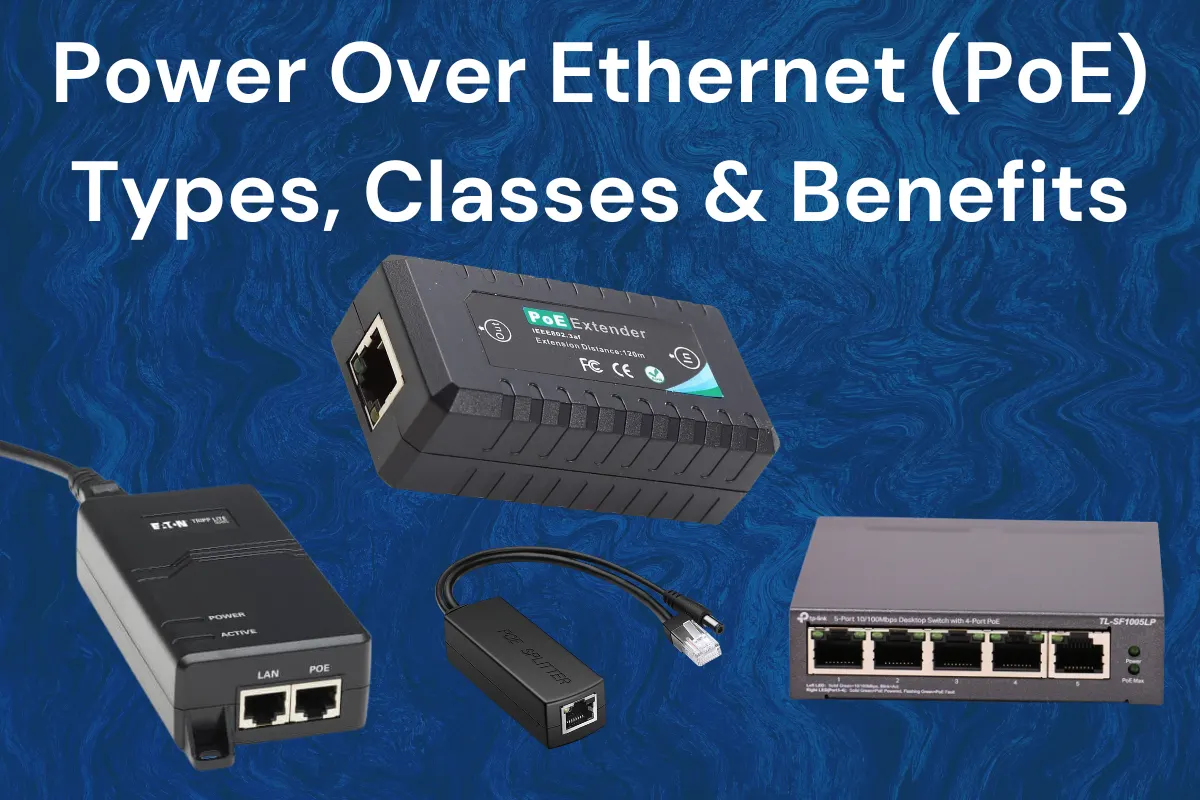
Different Types of PoE Devices
Next up are the different types of PoE Devices and what they are used for.
1. PoE Switches:
These are network switches that supply both data and power to all the connected devices.
➡️ Example: TP-Link TL-SG1008P 8-Port PoE Switch.
2. PoE Injectors:
This type is used when your existing switch doesn’t support your PoE. it adds power to the Ethernet line.
➡️ Shop PoE Injectors from one of the well-know online stores that is Spogmey.
3. PoE Splitters
These separate data and power for non-PoE devices, mainly useful when connecting older IP cameras or phones.
Applications of Power Over Ethernet
PoE is everywhere in modern networking setups. Common applications include:
- VoIP phones (e.g., Yealink, Fanvil, Grandstream).
- IP security cameras.
- Wi-Fi access points.
- IoT sensors.
- Smart lighting and automation.
- Digital signage displays.
💡 Did you know? Businesses using PoE can reduce power consumption by up to 40% through centralized energy management.
PoE Classes Explained
PoE devices are also ranked by classes, which determine how much power each device utilizes in order to work properly:.
Class | Power Range (W) | Device Type |
Class 1–2 | 4–7W | Basic VoIP phones |
Class 3–4 | 12–25W | Wi-Fi APs, cameras |
Class 5–8 | 45–90W | Displays, video bars |
When choosing devices, always check the PoE class compatibility on your switch or injector.
How to Select a Suitable PoE Setup:
Before setting up PoE in your network, consider these points first; it’ll make your installation and function easy:
- Device Requirements: First off, check wattage and PoE standard support.
- Network Infrastructure: Ensure cabling supports power delivery (Cat5e or higher).
- Port Count: Choose a switch with enough PoE ports for all your devices.
- Budget: Compare long-term savings between PoE switches and injectors.
- Future Adaptability: Go for PoE+ or PoE++ for future-proofing.
Example: Setting Up PoE for Yealink IP Phones
Let’s say you’re installing multiple Yealink SIP-T54W phones in an office. You can simply do these steps:
- Connect each phone to a PoE switch using Cat6 cables.
- The switch automatically powers all phones.
- No wall adapters, no clutter, no extra wiring.
For larger arrangements, use managed PoE switches to monitor power usage and device health.
👉 Browse Yealink PoE phones at Spogmey.shop.
Troubleshooting Common PoE Issues
Issue | Possible Cause | Solution |
Device not powering | Non-PoE switch | Add a PoE injector or upgrade switch |
Flickering connection | Insufficient power | Use PoE+ or PoE++ switch |
Heat buildup | The cable is too long or of low quality | Use Cat6a and shorten the distance |
Random reboots | Overloaded port | Check PoE budget per port |
Future of Power over Ethernet:
With the passage of time, more and more devices are becoming network-enabled, and PoE is evolving fast. Expect these:
- Higher wattage standards (up to 100W)
- Support for smart building systems
- Integration with AI-powered monitoring
- PoE++ in advanced meeting bars and 4K displays
All those businesses that adopted the same technology of PoE are already building infrastructure ready for the next decade of smart connectivity.
End Note: Why PoE is a smarter choice to opt for:
Whether you’re positioning a few IP phones or managing an enterprise-level network, Power over Ethernet gives a clean, effective, and adaptable solution.
It coordinates and simplifies the whole installation process, saves energy, and supports a wide range of modern tech gadgets.
Have questions or need expert guidance before upgrading your setup?
Contact Spogmey’s team — our specialists are here to help you choose the right PoE-enabled devices, switches, and accessories for your network.
FAQs
No, not all Ethernet cables are made on equal terms and need different conditions.
While PoE can be technically run on CATS, it is recommended to use CAT5e or CAT6 cables for smoother and better results. These new categories offer improved conductivity, higher data speeds, and reduced interference.
💡 Pro Insight: Most installers in the U.S. now standardize on CAT6 because it supports Gigabit Ethernet and full PoE++ power without voltage drop.
So, while CAT5 works, upgrading to CAT6 guarantees a future-proof network performance.
PoE can provide power and data over distances of up to 100 meters (328 feet), which is the standard Ethernet limitation.
If your device is farther than that, use a PoE extender or repeater. Each extender adds another 100 meters, but barely reduces total power (by around 4-5W)
Yes, completely, modern PoE switches are smart enough to detect whether a device supports PoE or not.
When a non-PoE device (for example basic PC or printer) is connected, the switch sends a low current test pulse. If the device doesn't work as a PoE-capable device, the switch stops sending a current test pulse and starts acting like a regular network switch.
⚠️ Important: Avoid using passive PoE switches, which send continuous voltage regardless of device type. Stick to active PoE switches (like Yealink or TP-Link models) for safe operation.
PoE is divided into Types and Classes based on power levels:
Type | Standard | Input Power (W) | Common Devices |
Type 1 | 802.3af | 12.95W | VoIP phones, basic cameras |
Type 2 | 802.3at | 25.5W | PTZ cameras, access points |
Type 3 | 802.3bt | 51W | LED lighting, video bars |
Type 4 | 802.3bt | 71.3W | All-in-one conferencing systems |
💡 Expert Tip:
Always check your PoE switch specs before connecting a high-wattage device. A Type 2 (PoE+) switch can’t safely power a Type 4 (Hi-PoE) camera.
Yes, PoE follows strict IEEE safety standards. The power negotiation process guarantees that voltages are only delivered once the device confirms it supports PoE.
This exchange stops overloads or short-circuits.
As long as you are using certified PoE devices and quality Ethernet cables, it's completely safe.
At the moment, no — mostly computers need far more power (60-120W) than even Type 4 PoE can deliver (max 71.3W).
However, PoE is many times used to power small network peripherals, for example, thin clients, IP phones, or docking hubs connected to a computer.
🧠 Interesting Fact: Some newer “mini PCs” and Raspberry Pi models support limited PoE input via special HAT modules — but they’re exceptions, not the norm.
Yes!
A PoE switch can power up multiple devices at once, but only within its total power budget.
For instance, if a switch has a 120W total PoE budget, it can run at least:
- 4 devices at 30W each, or
- 8 devices at 15W each.
Always calculate your total consumption before investing in connecting new devices to avoid underpowering.
In case your main power fails, your PoE devices will automatically go offline, unless your switch is backed by a UPS (Uninterrupted Power Supply).
AUPS keeps your PoE network running temporarily, giving you time to save work or shut down systems safely.
⚡ Pro Setup: Connect your PoE switch and router to the same UPS to ensure both power and data stay live during outages.
Usually, yes — PoE is designed to deliver only the required power to each device.
When merged with Energy-Efficient Ethernet (EEE), it reduces unnecessary draw when data activity is low.
🌱 According to the U.S. Department of Energy, PoE-based networks can lower total power consumption by 15–20% annually in commercial setups.
✍️ Author’s Bio
This piece is developed by Spogmey’s Research & Content Expert, in collaboration with IT managers and hybrid teams across the USA. Our experts test and review collaboration tools from leading brands like Yealink, Grandstream, OWL Labs, Snom, TP-Link, and Ubiquiti Networks. With hands-on evaluations in real small-to-medium business setups, we provide practical insights to help decision-makers choose the right technology for their meeting rooms and communication needs.
What is a SIP Phone? The Complete Beginner-Friendly Guide
Why Hang Up with Calling Party Control Matters in 2025
Difference Between a Video Conferencing Camera and a Webcam
Why Choose Spogmey?
Independent
We’re a fully independent wholesaler so you can count on us for unbiased advice.
Tech Support
Contact us before a sale, after a sale, whenever. Certified experts will help you.
Fast Delivery
Enjoy fast delivery with reliable service ensuring speed and satisfaction.
Blind Drop Shipping
Simplify your business — let us take care of storage and shipping.
Vendor Partners
No gray market here — we’re authorized to sell and support our products.
Provisioning
We configure endpoints to integrate with your VoIP system — no work for you.
Secure Shopping
256-bit SSL encryption protocols protect you and your information.
Payment Options
Flexible — use the payment method that works for you.
INFORMATION
PROGRAMS
CONTACT
Address
5900 Balcones Dr #19504 Austin TX 78731
- © 2025 Spogmey
- Terms & Conditions
- Sitemap
- Image
- SKU
- Rating
- Price
- Stock
- Availability
- Add to cart
- Description
- Content
- Weight
- Dimensions
- Additional information